Basic Fuzzing of Native Programs
What is Fuzzing?
Fuzzing is automated test generation that feeds lots of weird inputs into your code to shake out bugs. Modern fuzzers are coverage-guided: they learn which inputs open new code paths and then mutate those winners to go deeper. Pair that with runtime "oracles" like ASan (AddressSanitizer) and UBSan (UndefinedBehaviorSanitizer), and you catch memory corruption, overflows, UAFs, and UB quickly.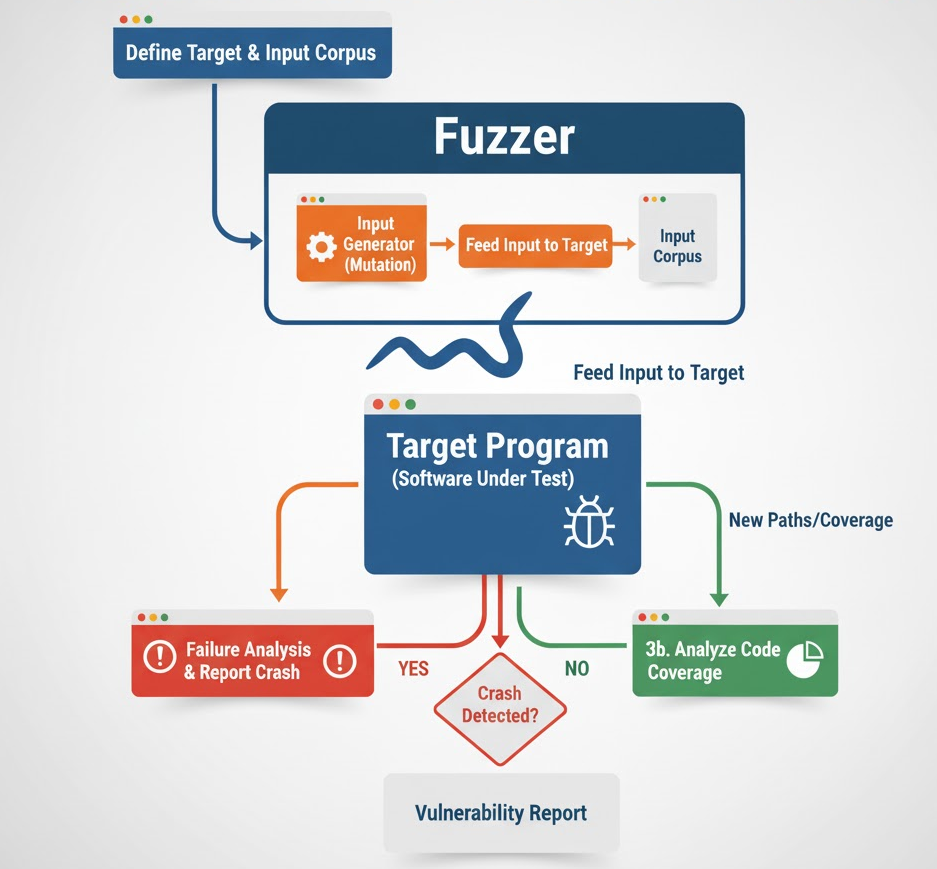
Types of Fuzzing
Black-box Fuzzing
Black-box fuzzing involves testing a program without any knowledge of its internal structure, code, or logic. The fuzzer generates inputs (e.g., random strings, malformed files, or network packets) and feeds them to the target, observing only external behavior such as crashes, errors, or unexpected outputs.
Key Characteristics:
- No visibility into internals: The fuzzer treats the program as a "black box," relying solely on input-output interactions.
- Input mutation: Inputs are generated randomly or mutated based on predefined rules (e.g., flipping bits, inserting garbage data).
- Examples: Fuzzing a command-line interface (CLI) tool by feeding it malformed files, or testing a web server by sending random HTTP requests.
- Tools: zzuf, Peach Fuzzer (in black-box mode), or custom scripts generating random inputs.
Advantages:
- Easy to set up: Requires minimal knowledge of the target, making it accessible for quick testing.
- Broad applicability: Works on any program with an input interface (e.g., APIs, file parsers, network protocols).
- No instrumentation overhead: Does not require modifying or analyzing the target program.
Limitations:
- Inefficient exploration: Lacks insight into code paths, leading to redundant testing of the same functionality.
- Lower coverage: Struggles to reach deeper code paths or edge cases without guidance.
- Slower bug discovery: Relies on chance to hit vulnerabilities, making it less effective for complex software.
Use Case:
Black-box fuzzing is ideal for quick, initial testing of closed-source applications, legacy systems, or scenarios where instrumentation is impractical. For example, fuzzing a proprietary PDF reader by feeding it thousands of malformed PDF files to detect crashes.
Grey-box Fuzzing
Grey-box fuzzing strikes a balance between black-box and white-box approaches by incorporating lightweight instrumentation to gain partial visibility into the program's execution. It uses feedback, such as code coverage (e.g., which code branches or edges are executed), to guide input generation and prioritize inputs that explore new paths.
Key Characteristics:
- Feedback-driven: The target is instrumented to track metrics like code coverage (e.g., edge coverage, basic block counters) or memory usage.
- Intelligent input mutation: The fuzzer uses feedback to prioritize inputs that increase coverage or trigger new behaviors.
- Examples: Fuzzing a library with tools like libFuzzer or AFL++ to identify memory corruption bugs by monitoring which code paths are exercised.
- Tools: AFL++, libFuzzer, honggfuzz, and LibAFL
Advantages:
- Improved efficiency: Coverage feedback helps the fuzzer focus on unexplored code paths, reducing redundant tests.
- Practical for real-world use: Balances speed and depth, making it the go-to choice for most modern fuzzing workflows.
- Scalable: Works well with large, complex codebases and can be applied to both open-source and proprietary software with instrumentation.
Limitations:
- Instrumentation overhead: Requires compiling the target with coverage tracking or using binary instrumentation, which can be complex for some systems.
- Limited reasoning: Does not deeply analyze program logic, so it may miss bugs in highly conditional or state-dependent code.
- Dependency on quality feedback: Effectiveness depends on how well the instrumentation captures meaningful execution data.
Use Case:
- Grey-box fuzzing is widely used in modern software development and security testing. For instance, fuzzing a network protocol implementation with AFL++ to find buffer overflows by prioritizing inputs that trigger new code paths. It\u2019s particularly effective for open-source projects or systems where source code or binary instrumentation is feasible.
White-box Fuzzing
White-box fuzzing leverages detailed knowledge of the program\u2019s internal structure, often using advanced techniques like symbolic execution or concolic execution to systematically explore code paths. It analyzes the program's control flow and constraints to generate inputs that target specific execution paths.
Key Characteristics:
- Deep program analysis: Uses tools like symbolic execution (e.g., KLEE) or concolic execution (e.g., SAGE) to model program behavior and solve path constraints.
- Path exploration: Generates inputs that satisfy specific conditions to reach deep code paths or edge cases.
- Examples: Using KLEE to fuzz a small C program by solving constraints to trigger specific branches, or applying SAGE to test a file parser for security vulnerabilities.
- Tools: KLEE, SAGE, Angr,.
Advantages:
- High precision: Can systematically explore complex code paths and uncover deeply hidden bugs.
- Effective for small codebases: Excels at thoroughly testing well-defined modules or functions with complex logic.
- Hybrid potential: Often combined with grey-box fuzzing to leverage both deep analysis and scalability.
Limitations:
- High computational cost: Symbolic execution and constraint solving are resource-intensive, limiting scalability for large programs.
- Complexity: Requires expertise to set up and interpret results, as well as access to source code or detailed program models.
- Path explosion: The number of possible execution paths can grow exponentially, making exhaustive exploration impractical.
Use Case:
White-box fuzzing is best suited for critical, well-defined components where deep analysis is justified, such as cryptographic libraries or protocol parsers. For example, using KLEE to test a compression library for edge-case bugs by solving constraints to reach rare code paths.
Hybrid Approaches
In practice, many fuzzing workflows combine elements of black-box, grey-box, and white-box fuzzing to maximize effectiveness. For example:
- Grey-box + White-box: Tools like Dr. Fuzz or QSYM integrate coverage-guided fuzzing with selective symbolic execution to balance speed and depth.
- Black-box + Grey-box: Start with black-box fuzzing to quickly identify low-hanging bugs, then switch to grey-box for deeper exploration.
- Custom workflows: Security researchers often chain multiple fuzzers, using black-box to generate initial inputs, grey-box to refine them, and white-box to target specific vulnerabilities.
- Input strategies:
- Mutation-based (common): start from valid seeds, mutate them. Great for binary formats, images, parsers.
- Generation/grammar-based: synthesize inputs from a spec/grammar (e.g., libprotobuf-mutator). Higher validity, excellent for deeply structured formats.
Different kind of fuzzers
| Fuzzer | Style | Coverage Source | How You Drive It | Strengths | Gotchas |
| libFuzzer | In-process, mutation-based (grey-box) | LLVM SanitizerCoverage (edge counters) | Implement `int LLVMFuzzerTestOneInput(const uint8_t*, size_t)` | Very fast; unit-test style harness, great with ASan/UBSan | Single target per binary, in-process requires fuzzer-safe code (no global leaks/stateful crashes) |
| AFL++ | Fork-server (grey-box), plus QEMU/Frida modes | Compiler RT or binary instr., QEMU DBT, Frida hooks | Feed files/stdin to `main()`, use persistent_mode for speed | Handles big apps/whole programs, rich corpus tools, many modes | Slower per-exec than in-process, best perf needs harnessing/persistent loop |
| LibAFL | Modular framework: in-process or fork-server; QEMU/Frida | Compiler instr., QEMU DBT, Frida hooks, custom observers | Write a harness (Rust or C/C++ via bindings); plug-and-play mutators/schedulers, supports persistent loops | Highly customizable, advanced schedulers, scale-out/distributed friendly, mobile (Frida) support | Steeper learning curve, more engineering to assemble a pipeline, fewer drop-in harnesses |
| Honggfuzz | Fork-server (grey-box) | Binary instrumentation | Similar to AFL++ (files/stdin), persistent mode available | Simple setup; solid performance, handy features (perf counters, sanitizers) | Smaller ecosystem vs. AFL++, fewer modes/integration options |
Choosing the right Fuzzer
Start with your target & constraints.
Have source and a callable parser/decoder? Use libFuzzer.
- In-process, very fast, great with ASan/UBSan, ideal for small, deterministic harnesses.
Fuzzing a whole program or binary-only target? Use AFL++.
- Prefer compiler instrumentation; switch to QEMU mode for closed binaries, or Frida mode to hook functions in mobile apps/.so files.
Need a customizable, scalable pipeline? Use LibAFL.
- Mix-and-match schedulers/mutators, supports distributed runs and deep mobile hooking (QEMU/Frida); more engineering effort up front.
Want a lean fork-server with solid performance? Use Honggfuzz.
- Simpler setup, fewer moving parts.
Rule of thumb:libFuzzer for fast, source-instrumented libraries, AFL++ for programs & binaries (QEMU/Frida as needed), LibAFL for advanced/bespoke pipelines, Honggfuzz for a straightforward fork-server.
What is a Fuzzing Harness?
The harness is the adapter between the fuzzer and your code under test. For libFuzzer, you implement: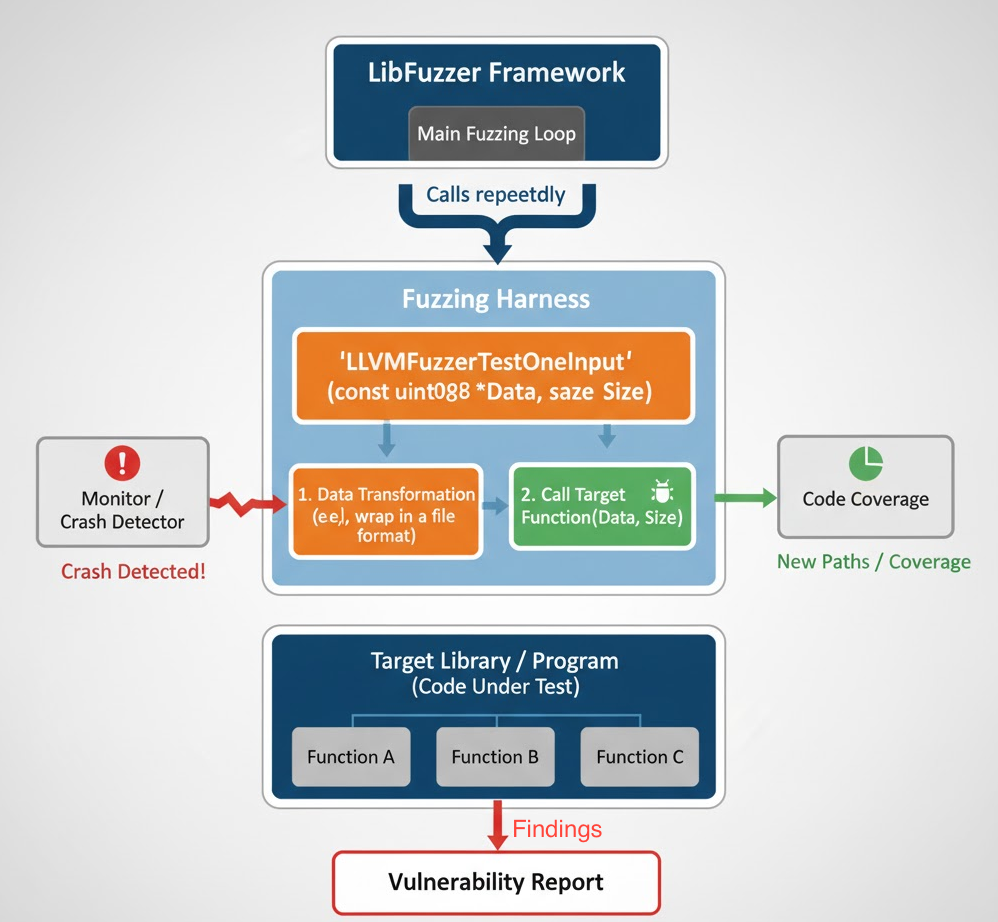
Good harnesses:
- deterministic (same input same behavior),
- apply guardrails (size caps, format gates) to avoid OOM/timeouts,
- clean up allocations every iteration,
- drive deep code paths (e.g., actually decode, not just sniff).
- How to Create a Harness (Step-by-Step)
- Pick targets that parse untrusted data (file formats, network packets, codecs).
- Write the harness: minimal validation call the target parser/decoder.
Build with sanitizers + coverage:
- Seed & (optionally) dictionaries: give a few tiny valid seeds and protocol/format tokens.
- Run + triage: let it run, minimize crashes, deduplicate, inspect ASan reports.
Let's put this into practice by building fuzzing harnesses for Android-used libraries. We'll focus on two realvulnerabilities: libpng (CVE-2019-7317, use-after-free) and libwebp (CVE-2023-4863, heap overflow).
libpng CVE-2019-7317 (Use-After-Free):
The use-after-free occurs because the `png_image_free_function` is incorrectly called under `png_safe_execute`. This can cause the program to reuse memory that has already been freed, leading to a crash.
Get a vulnerable libpng
We're using libFuzzer as our fuzzer of choice because it runs in-process (in-memory) and is fast. To build a good harness, we first need to understand how to call the target APIs correctly, what a valid call looks like, required initialization, and cleanup. So we start by reading the libpng documentation and selecting the right functions to drive from our harness (see: libpng manual: https://www.libpng.org/pub/png/libpng-manual.txt)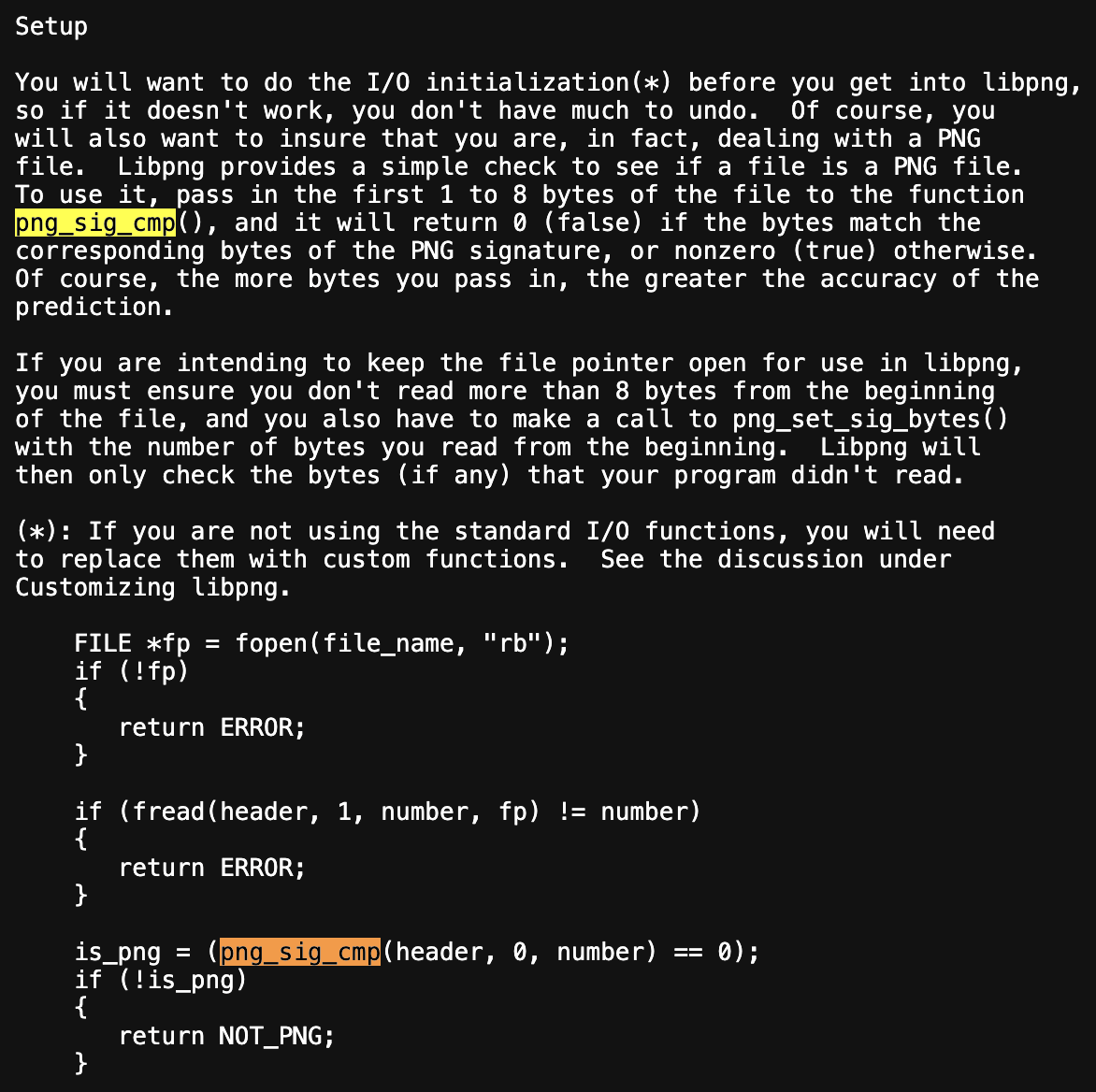
We include png headers file to access the png required functions to setup the harness
To use libFuzzer, our harness must implement its entry point.
Standard libFuzzer hook. In-process fuzzer calls this function many times with mutated inputs
To guard against oversized inputs by checking the mutated buffer's length
- Reject inputs < 8 bytes they can't even contain the PNG signature, skip to save cycles.
- Cap inputs > 1 MiB to avoid oversized cases that often trigger OOM or slow paths. Adjust this threshold as needed.
Format gate (PNG magic)
- Quickly rejects non-PNG data so mutations focus on valid-ish PNGs.
- const_cast is used because png_sig_cmp expects a non-const pointer type. (It does not modify the bytes.)
Set up png_image
Zero-init is required; version must be set per the simplified API contract.
decode from memory
- Parses headers / basic metadata from mutitated data. If parsing fails, bail out.
- On success, img.width, img.height, and other fields become available.
Dimension caps
- To prevents allocating huge sizes from allocating massive buffers later.
- Important for stable fuzzing, adjust thresholds per your machine.
Choose output format + compute buffer size
- Forces a concrete pixel format (32-bpp) to drive real decode paths (filters, interlace, chunks).
- Uses libpng's macro to compute the required output size; caps it to ~16 MB.
Allocate output:
Caller-allocated buffer keeps control over memory use (vs. letting the library allocate huge blocks).
Decode function:
- Performs the actual image read into buffer.
- Even if it returns failure, the library traversed deep code (good for coverage).
Cleanup every path
To prevent per-iteration leaks, ensure cleanup runs on every path.
Harness
compile the harness
Running the fuzzer
You can copy the PNG corpus files from the libpng directory and run the fuzzer.
Within a minute, the fuzzer should crash and ASan will produce a report.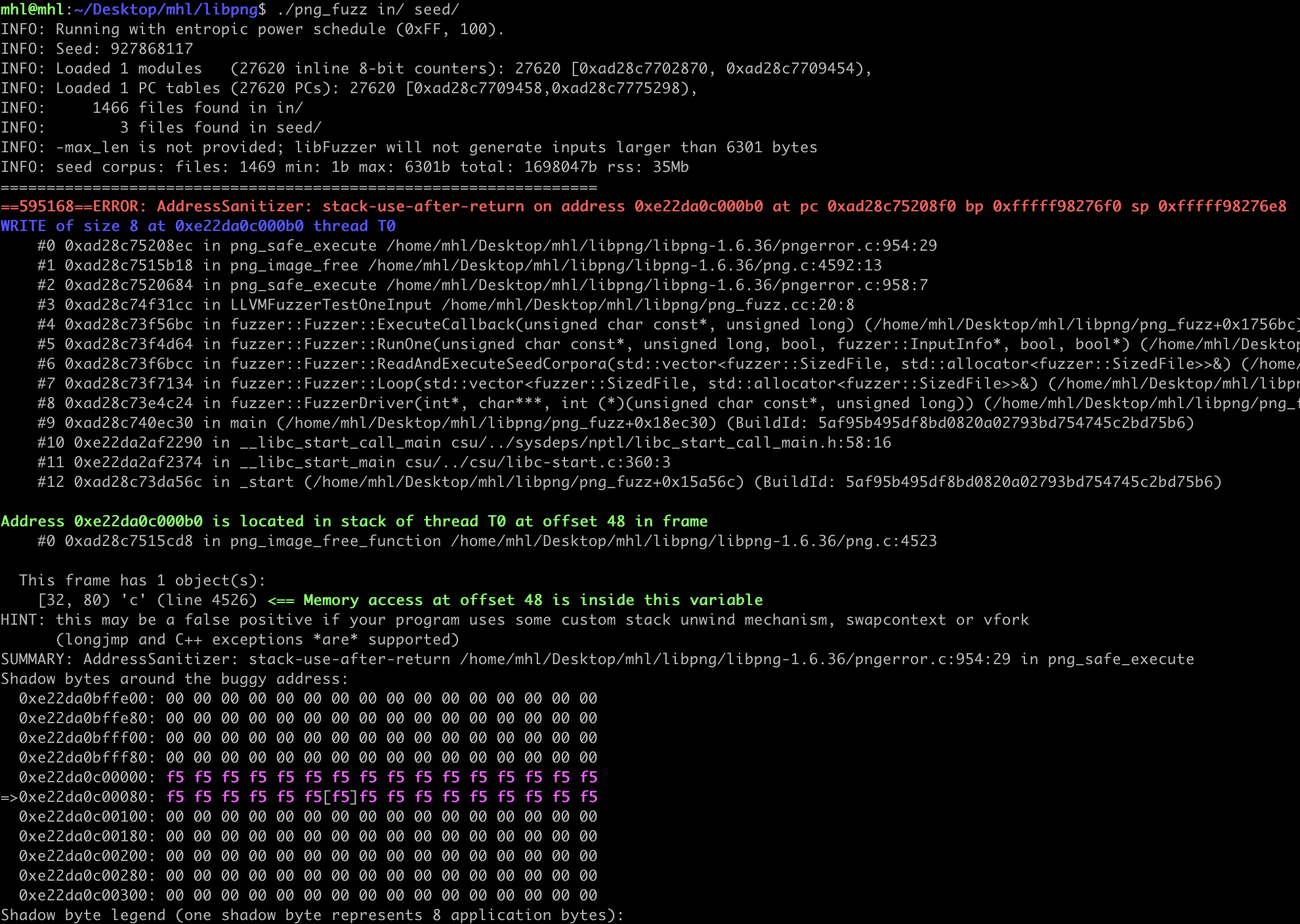
You'll find the crash file in the same directory as your harness. Use it for deeper analysis e.g., building an exploit or PoC and you can reproduce the crash by running the fuzzer directly on that file.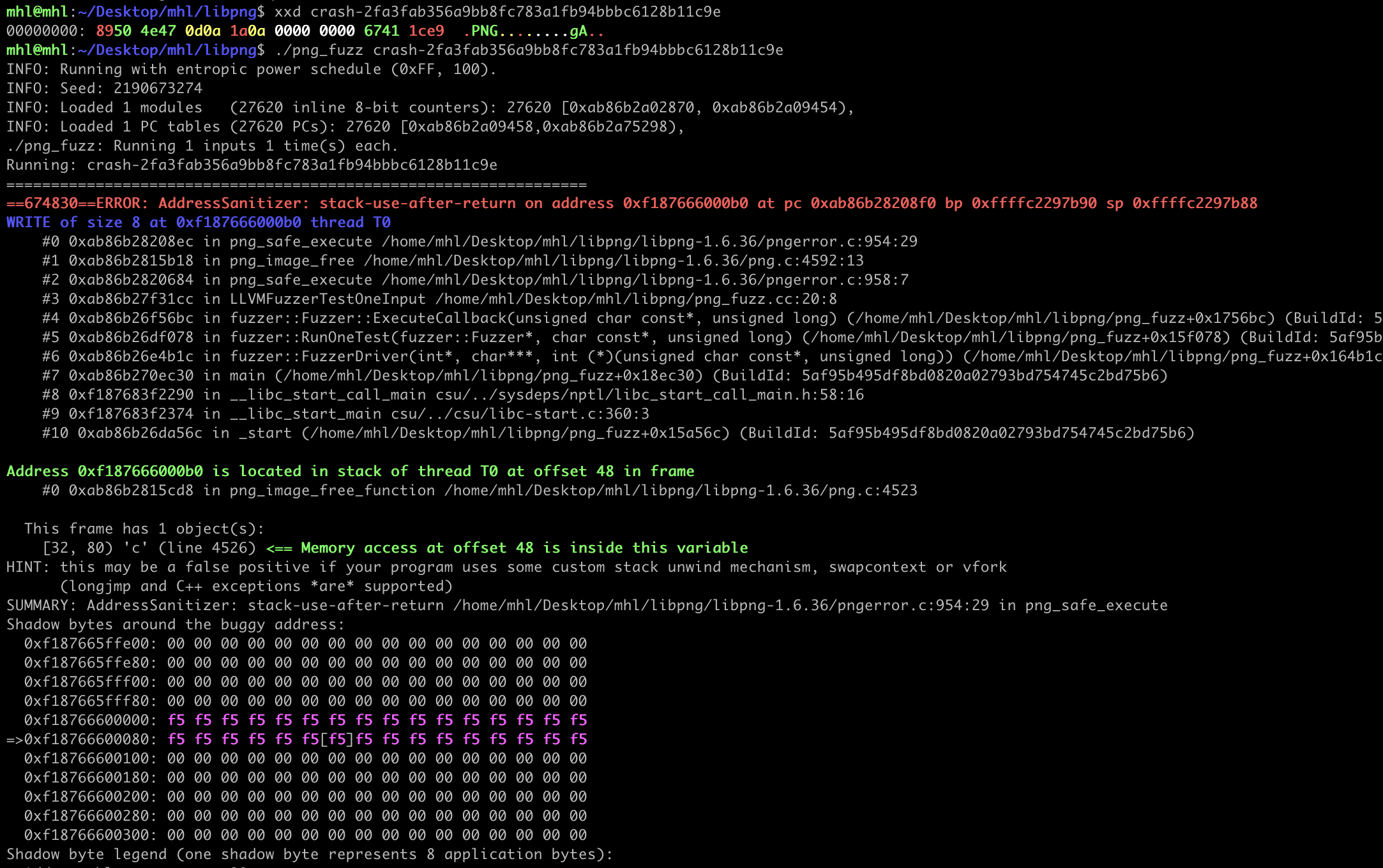
libwebp CVE-2023-4863
The bug lives in the lossless WebP (VP8L) decoder, specifically in how it builds Huffman coding tables. A maliciously crafted WebP can cause BuildHuffmanTable to construct tables larger than the allocated buffer, triggering a heap buffer overflow. (See the WebP API docs: http://developers.google.com/speed/webp/docs/api)
To build the fuzzing harness, we consult the libwebp documentation to choose the right decode APIs and call sequence what a valid invocation looks like, the required initialization (WebPDecoderConfig, colorspace), incremental vs. one-shot decode, and proper cleanup (WebPFreeDecBuffer, WebPIDelete). This ensures the harness drives the vulnerable code paths deterministically while staying stable and leak-free.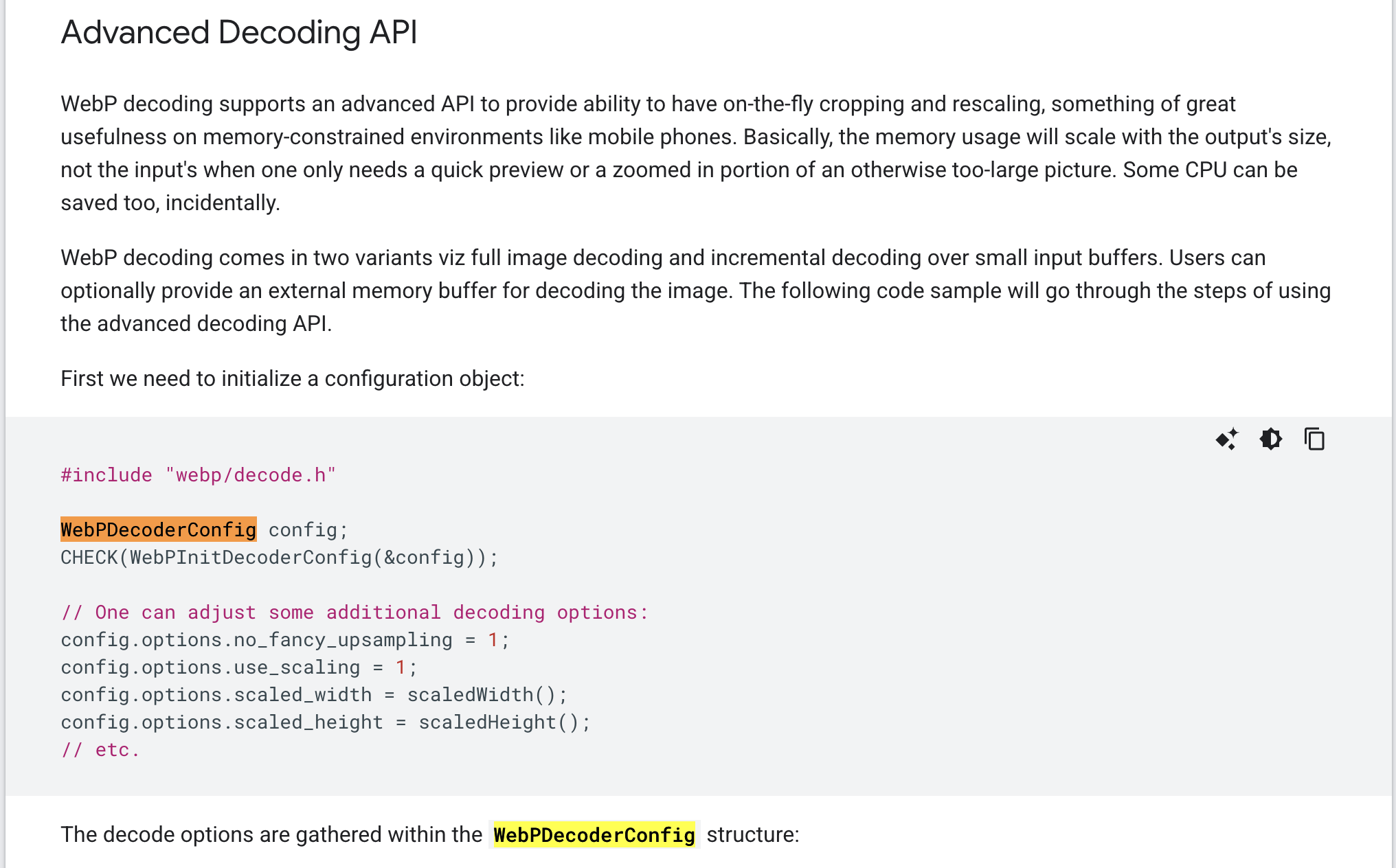
Get a vulnerable libwebp
Includes: types + libwebp API
webp/decode.h exposes the decoder (incremental + one-shot) and config structs.
libFuzzer entrypoint
The function libFuzzer repeatedly calls with mutated inputs (in-process).
Decoder configuration: deterministic, concrete output
It initializes the decoder configuration with safe defaults, forces a specific colorspace so the decoder exercises real pixel pipelines, and disables threading to avoid nondeterministic races or masking crashes.
Split input: set up incremental decode
The code first computes a halfway point in the input (mid = size / 2, clamped to at least 4 bytes) so the initial chunk isn't small. It then creates an incremental decoder with WebPIDecode(NULL, 0, &config) to consume the data in chunks. If the decoder allocation fails, it frees the output buffer stored in config and returns immediately.
Feed chunk #1 and handle early aborts
The harness feeds the first half of the input to the incremental decoder with WebPIUpdate(idec, data, mid), which typically parses the RIFF/WEBP header and discovers basic features. If this call returns VP8_STATUS_OUT_OF_MEMORY or VP8_STATUS_USER_ABORT, it cleans up by deleting the decoder and freeing the output buffer in config, then returns immediately to abort the current iteration.
Feed chunk #2 to drive deeper states
It then feeds the second half of the input WebPIUpdate(idec, data + mid, size - mid) to continue the bitstream, which drives the decoder into deeper stages such as the lossless VP8L or lossy VP8 paths, including entropy/Huffman table construction, alpha processing, and other decode logic.
Dispose the incremental decoder
Prevents leaks between the iterations (critical in-processing fuzzing).
Also try the one-shot decode path:
The harness also exercises the one-shot decode path by calling WebPDecode(data, size, &config), which traverses slightly different glue and validation code than the incremental flow. After this call, it explicitly frees the output buffer stored in config\u2014which libwebp allocated via WebPFreeDecBuffer(&config.output), and then returns.
Harness
Compile the harness
resource limits & smarter guidance
Running the Harness
After 8 - 10 hours hours running fuzzer we go the crash.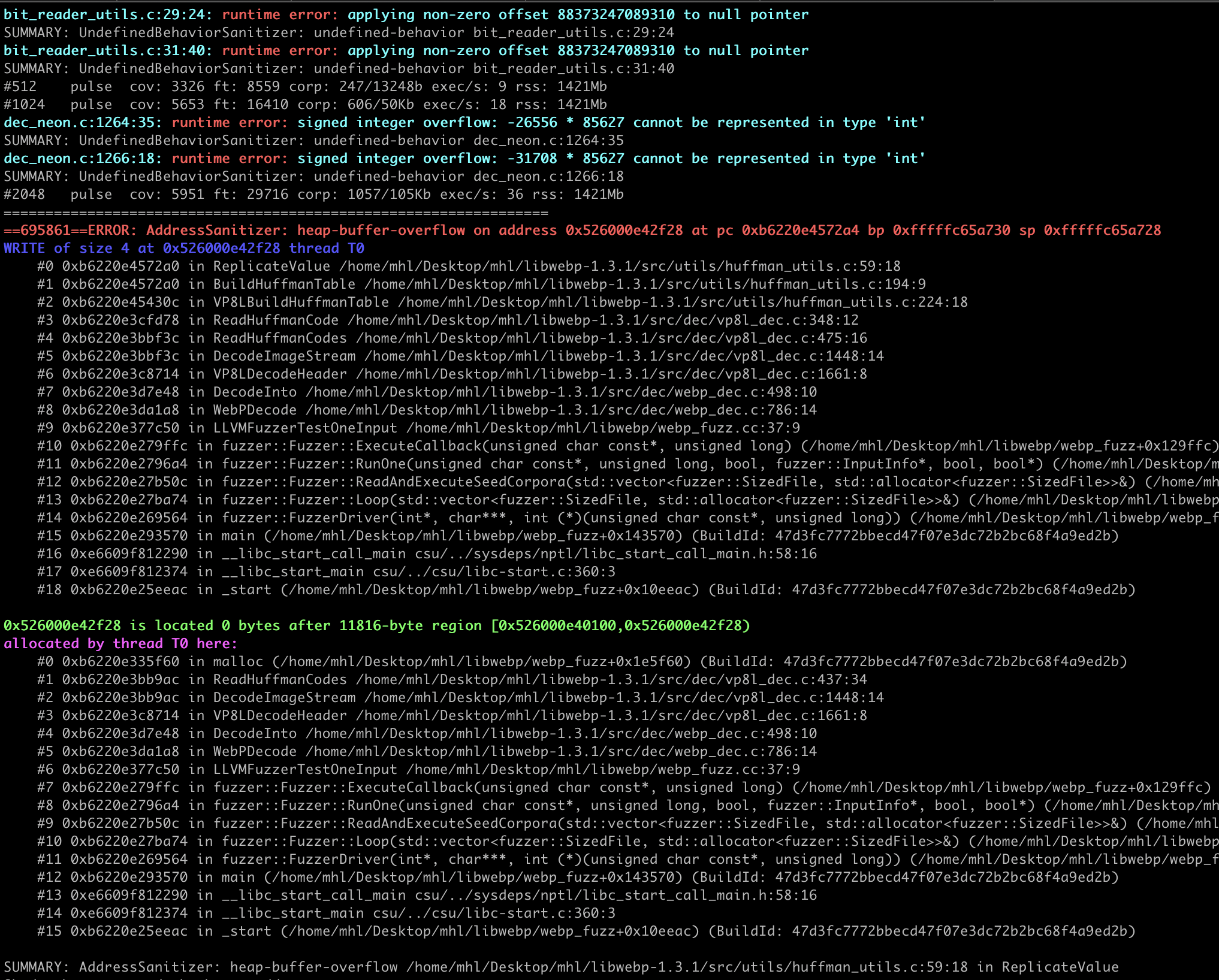
While fuzzing, we hit frequent OOMs and slow-path timeouts. Our initial genericWebP harness did reach the Huffman code path, but crashes were slow to surface. So we need to refine it into a VP8L-focused libFuzzer harness that adds strict checks on mutated inputs and tight resource caps. This version is designed for stability while reliably driving the lossless WebP (VP8L) Huffman path the area implicated in CVE-2023-4863.
You can run the fuzzer with flags like -ignore_ooms=1 (and even -ignore_timeouts=1) to keep the campaign moving past crashes and hangs, but it's not a silver bullet. Some mutated images can drive resident memory (RSS) so high that the process still runs out of memory despite the ignore setting. In practice, you'll want to combine those flags with tighter resource limits\u2014e.g., -rss_limit_mb, -max_len, and dimension/pixel caps in the harness to prevent pathological inputs from blowing up memory in the first place.
- Pre-parses RIFF/WEBP: verifies RIFF/WEBP magic, iterates chunks, requires a VP8L chunk.
- Caps chunk sizes: rejects chunks larger than a small threshold (e.g 32 KiB) to avoid OOM/slow paths.
- Uses WebPGetFeatures: quickly probes width/height/format, then clamps dimensions/pixel count.
- Decodes into a caller buffer with WebPDecodeRGBAInto (small, fixed size) to prevent huge internal allocations.
- Keeps fuzzing deterministic and fast (size limits, no threads), making it ideal when you're seeing OOMs/timeouts but still want to reach the Huffman table build code.
Refined harness
Compile the harness
Running the harness
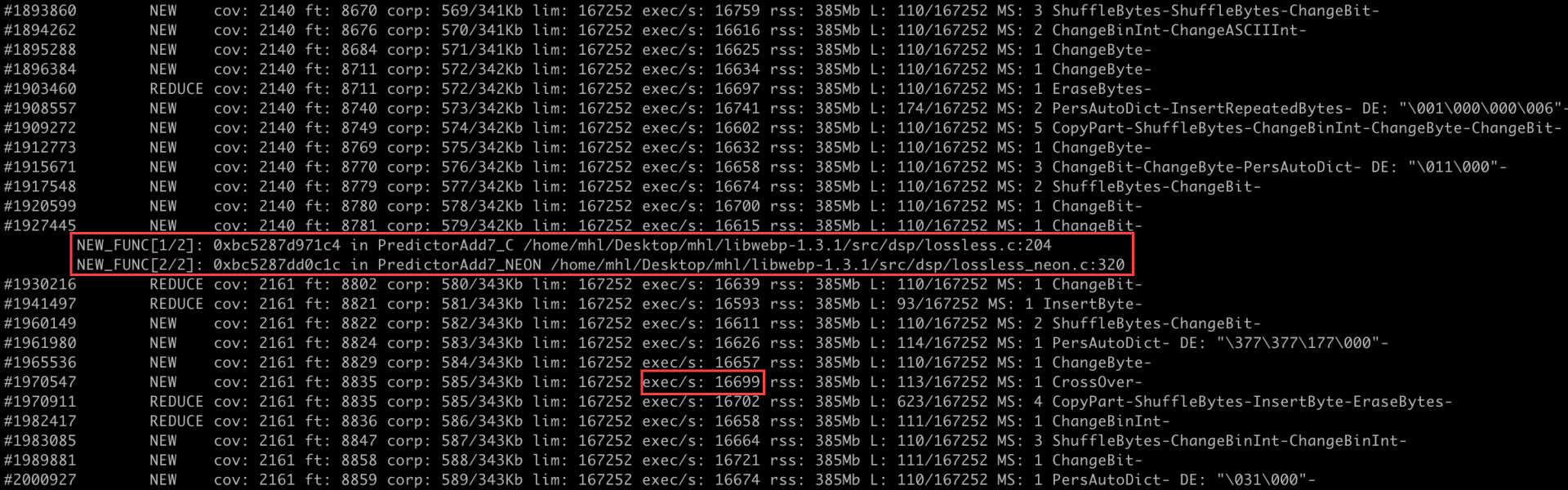
With the refined harness, execution was smoother and consistently reached the lossless (VP8L) code path without OOMs or timeouts. We were also able to reproduce the crash within 2-3 hours.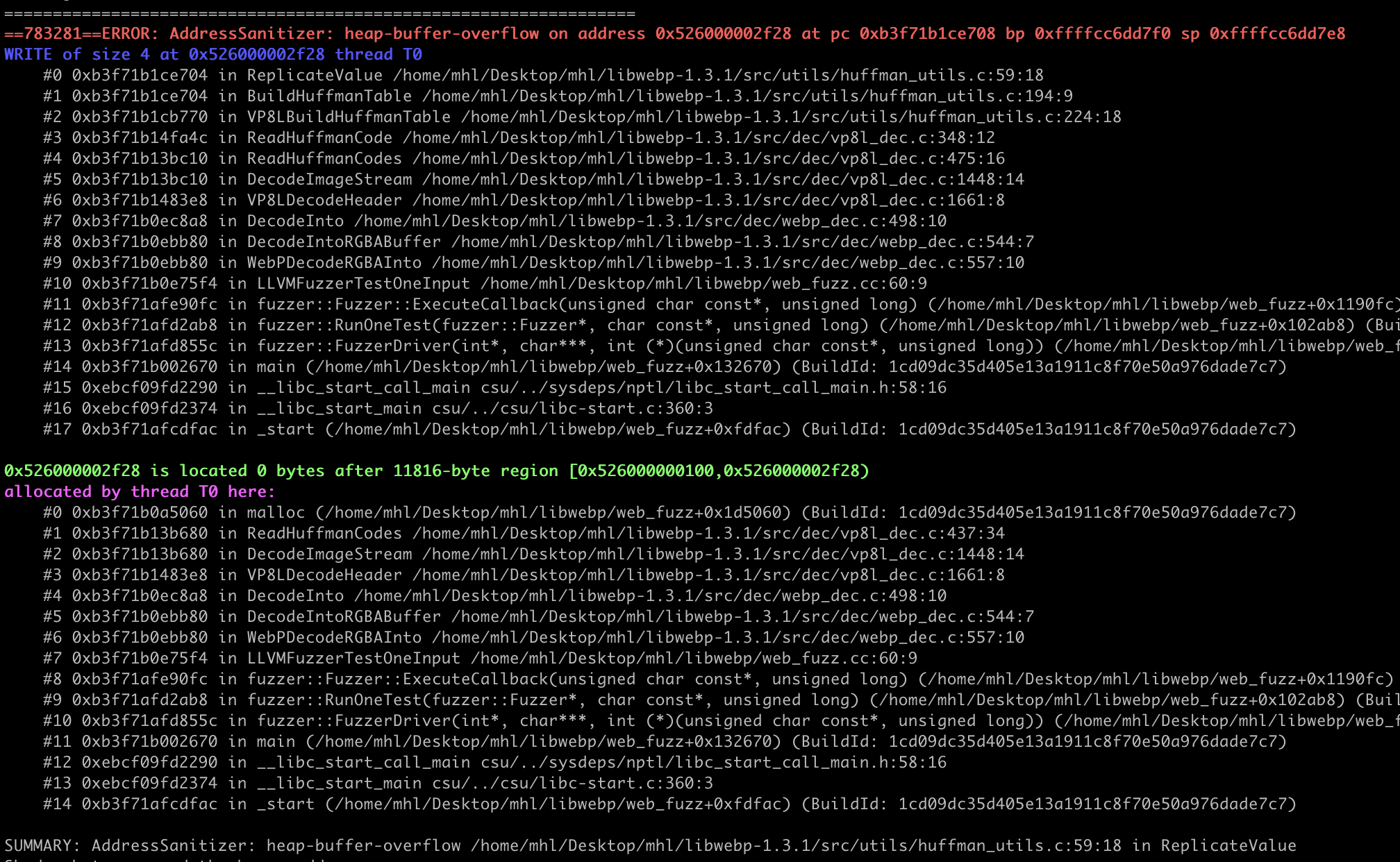

Conclusion
In this Blogpost, we started with a simple goal,explain what fuzzing is, the main types, and then apply white-box fuzzing to Android-relevant libraries and turned it into a repeatable workflow that surfaces real bugs. Using libFuzzer with ASan/UBSan, we built two harnesses that balance depth and stability: a straightforward decoder harness for libpng (reproducing the CVE-2019-7317 use-after-free on 1.6.36) and a refined, VP8L-focused harness for libwebp (triggering the CVE-2023-4863 Huffman overflow on 1.3.1). Along the way, we handled the practical realities of image-codec fuzzing OOMs, slow units, and timeouts by adding size/dimension caps, caller-allocated buffers, and input pre-parsing (RIFF/VP8L checks).
The result is more than two PoCs: it's a portable methodology you can apply to other native libraries used in Android apps. Pick a vulnerable or high-risk parser, study its public API, design a deterministic, leak-free harness that exercises deep code paths, and add sensible validations so the fuzzer explores productively instead of drowning in pathological inputs. We also showed how to reproduce deterministically and minimize crashing inputs. With these patterns in hand, you can iterate across additional file formats and media stacks common on Android confident your fuzzing will be fast, stable, and capable of rediscovering (and preventing) real-world vulnerabilities.
Now that we've covered fuzzing with source available, do you want to learn advanced binary-only fuzzing where you don't have the source, you pull a library from a mobile device, reverse it to find target functions, and fuzz it by emulating with QEMU or fuzzing on-device with Frida mode and then move on to exploitation?
Check out our courses that cover full chain exploitation,
Android Userland Fuzzing and Exploitation
https://www.mobilehackinglab.com/afe-promo
Android Kernel Fuzzing and Exploitation
https://www.mobilehackinglab.com/courses/kernel-fuzzing.html
Get both together with a special bundle sale with 60% discount!
https://www.mobilehackinglab.com/bundles?bundle_id=android-kernel-userland
Want to learn to Chained AppSec bugs to get remote code execution?
Advanced Android Hacking - Road to Pwn2Own
https://www.mobilehackinglab.com/course/advanced-android-hacking

Copyright © 2024 (function() { if (!window.opener) return; if (window.location.search.indexOf('msg=not-logged-in') !== -1) return; if (window.location.pathname.indexOf('signin') !== -1) return; function send(email, lwToken) { if (!email || email.indexOf('@') === -1) return; window.opener.postMessage({ type: 'mhl-lw-login', email: email.toLowerCase().trim(), lwToken: lwToken || '' }, '*'); setTimeout(function() { try { window.close(); } catch(e) {} }, 500); } function findToken() { // Scan localStorage for any JWT that contains an email — that's the LW user token try { var keys = Object.keys(localStorage); for (var i = 0; i < keys.length; i++) { var v = localStorage.getItem(keys[i]); if (!v || v.split('.').length !== 3) continue; try { var p = JSON.parse(atob(v.split('.')[1].replace(/-/g,'+').replace(/_/g,'/'))); if (p && p.email) return { email: p.email, token: v }; } catch(e) {} } } catch(e) {} return null; } function tryGlobals() { var checks = [window.LW && window.LW.user, window.learner, window.__learner, window.lwUser, window.currentUser]; for (var i = 0; i < checks.length; i++) { if (checks[i] && checks[i].email) return checks[i].email; } return null; } function tryApis(done) { var endpoints = ['/api/v2/me', '/api/v2/learner', '/api/v2/learner/profile']; var i = 0; function next() { if (i >= endpoints.length) return done(null); fetch(endpoints[i++], { credentials: 'include' }) .then(function(r) { return r.ok ? r.json() : null; }) .then(function(d) { if (!d) return next(); var e = d.email || (d.data && d.data.email) || (d.user && d.user.email); e ? done(e) : next(); }).catch(next); } next(); } window.addEventListener('load', function() { // Best case: find token in localStorage (has email + is the LW JWT) var found = findToken(); if (found) return send(found.email, found.token); // Try JS globals var email = tryGlobals(); if (email) return send(email, ''); // Try LW's own same-origin API tryApis(function(email) { if (email) send(email, ''); }); }); })();
Socials